
Building a RAG Benchmark You Can Actually Trust: We Kept Crowning the Wrong Mode.
On This Page
- Six Ways to Build a Knowledge Base
- Which Mode Fits Which Use Case
- Scoring That Matches Your Use Case
- One Verified Recommendation
- Choosing with Confidence
- A Complete Worked Scenario
- Ready to Find Your Mode?
A retrieval benchmark makes a promise: feed it your documents, and it will tell you — with a number — which RAG strategy answers questions best. Vector search, a page-tree index, a knowledge graph, a wiki. Pick a winner, apply it, move on.
Key Takeaways
- No single RAG mode is universally "best" — it depends on your use case and corpus
- DocuMind's benchmark tests all 6 modes fairly on your own documents
- Use-case-weighted scoring (compliance ≠ FAQ ≠ research) produces relevant recommendations
- Accuracy decides winners; speed and cost are reported separately
First, a quick primer. Retrieval-Augmented Generation (RAG) is the technique behind most document-aware AI assistants. Instead of relying only on what a large language model memorized during training, a RAG system first retrieves the most relevant passages from your own documents, then hands them to the model as context so it can generate a grounded, cite-able answer. The quality of that answer depends heavily on one thing: how well the retrieval step finds the right material. A "RAG mode" is simply a different strategy for organizing your documents and retrieving from them — and that choice is what this post is about.
There is no single "best" way to build a knowledge base, though. A support FAQ, a compliance archive, and a research library each reward a different retrieval strategy — and picking the wrong one quietly costs you accuracy for the life of the system.
DocuMind's benchmark engine exists to answer that promise concretely: for your documents and your use case, which retrieval mode actually performs best? Not in theory — measured, on your own corpus, with the same questions asked of every mode side by side.
Here's what each mode is built for, and how a single, verified recommendation comes out the other end.
Six ways to build a knowledge base
Every mode answers the same questions against the same documents. What differs is how each one organizes the content for retrieval.
The same language model writes the final answer in every mode, so that part never changes. What changes is what the model is given to work with. Vector and OpenKB pass it raw chunks of text and leave it to join the dots. Graph and PageIndex link the facts first, so the model gets material that is already joined up. The benchmark itself does no reasoning. It just runs the six modes and scores the answers, so any difference in results comes from how each mode organizes the content.
- Vector — classic embedding search over chunked text. Fast and cost-efficient; strongest on direct, factual lookups. Real-world example: a customer-support FAQ where a user asks "What's your refund window?" and the answer sits in one clear paragraph.
- PageIndex — navigates a document's own table-of-contents-style tree instead of chunking blindly. Strong on long, structured documents where section context matters. Real-world example: a 120-page vendor contract where "What are the termination clauses in Section 8?" needs the whole section, not a stray sentence.
- Graph — extracts entities and relationships into a knowledge graph. Strongest on multi-hop questions that connect facts across sections or documents. Real-world example: "Which supplier shipped the components used in the recalled product line?" — a chain that spans a supplier list, a bill of materials, and a recall notice.
- Wiki — restructures content into cross-linked topic pages. Good for synthesis questions that draw together scattered information into one answer. Real-world example: "Summarize everything we know about our Q3 cloud-migration project" — pulled together from meeting notes, status reports, and design docs.
- OKF — an open-knowledge-fabric layer of extracted concepts. Suited to conceptual/definitional questions rather than verbatim lookups. Real-world example: "What does 'material adverse change' mean across our legal templates?" — a concept defined slightly differently in many places.
- OpenKB — a lighter hybrid page structure for corpora too large for full tree indexing but still benefiting from some structure over raw chunks. Real-world example: a 50,000-document internal knowledge base where building a full tree per document would be too slow, but pure chunking loses too much context.
A benchmark run moves in one direction, and the diagram below traces it end to end. Your documents and an auto-generated question set enter on the left. All six modes then answer that same question set in parallel, on identical inputs — so the only thing separating them is how each one organizes and retrieves the content. Every answer is scored with use-case weighting, and the run narrows to a single recommended mode on the right.
Question generation process — DocuMind reads your uploaded documents, groups their sections by topic so no corner of the corpus is left out, then turns the richest section in each topic into questions — four kinds at once: quick factual lookups, real-world scenario questions, comparison questions that span several documents, and broader synthesis questions — each asked from a different reader's point of view, from a first-time reader to a compliance officer. That mix is what makes the test a fair one: it spreads the questions across your whole corpus instead of the loudest topic, it stretches every mode from easy recall to hard reasoning, and because each question is checked against your documents before the run, nothing unanswerable ever reaches the score.
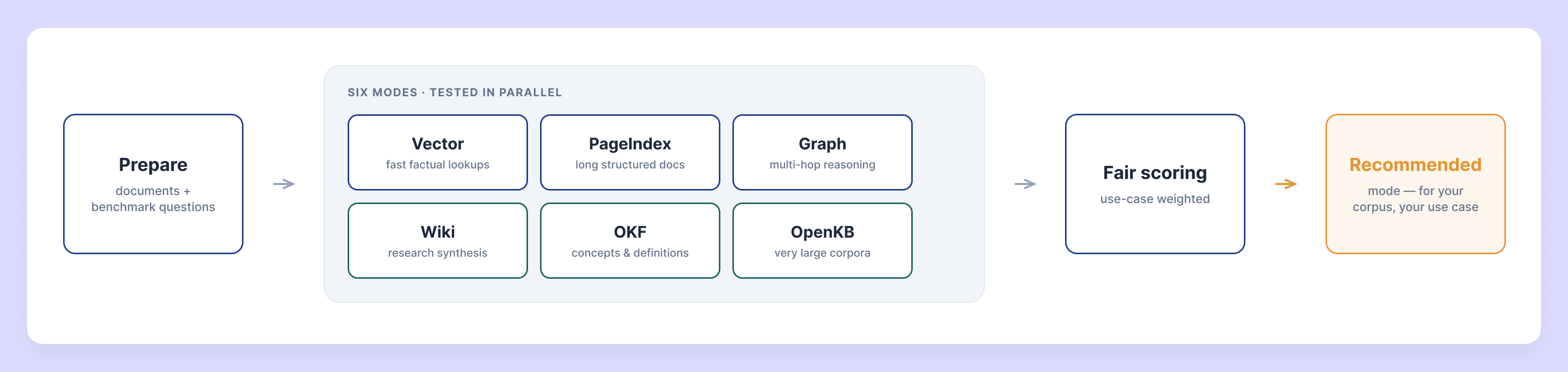
System architecture
Scoring is one part of a larger machine. The benchmark execution engine is what drives an entire run: it spins up an isolated knowledge base per mode, orchestrates all six as they answer the question set, grades every answer through its scoring component (scorer.py), and writes the results away. The "Fair scoring" box in the pipeline diagram above is that one component, seen from the flow's point of view. The diagram below opens the same engine up from the inside — five components built for scale, isolation, and statistical rigor:
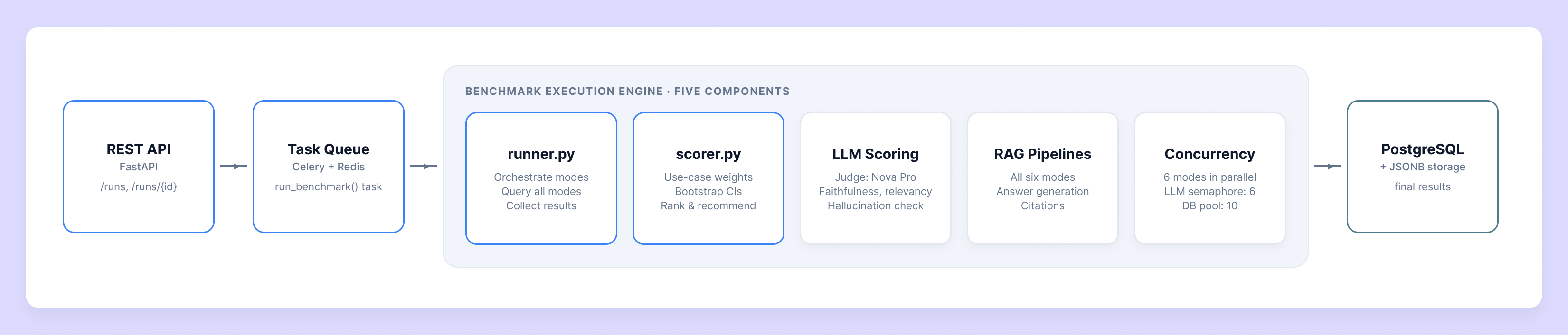
The clearest way to see what separates the modes is a question that no single document can answer. The example below is a made-up scenario with made-up vendor figures, written only to show the mechanics. It is not the output of a real benchmark run.
A logistics team keeps three regional performance reports: West, East, and South. Each is its own document, and each contains a table of vendors and their late-delivery rates. Those three documents are the entire knowledge base the modes work with. To answer correctly, a mode has to read all three tables and compare across them, because the highest rate in one region says nothing about the other two.
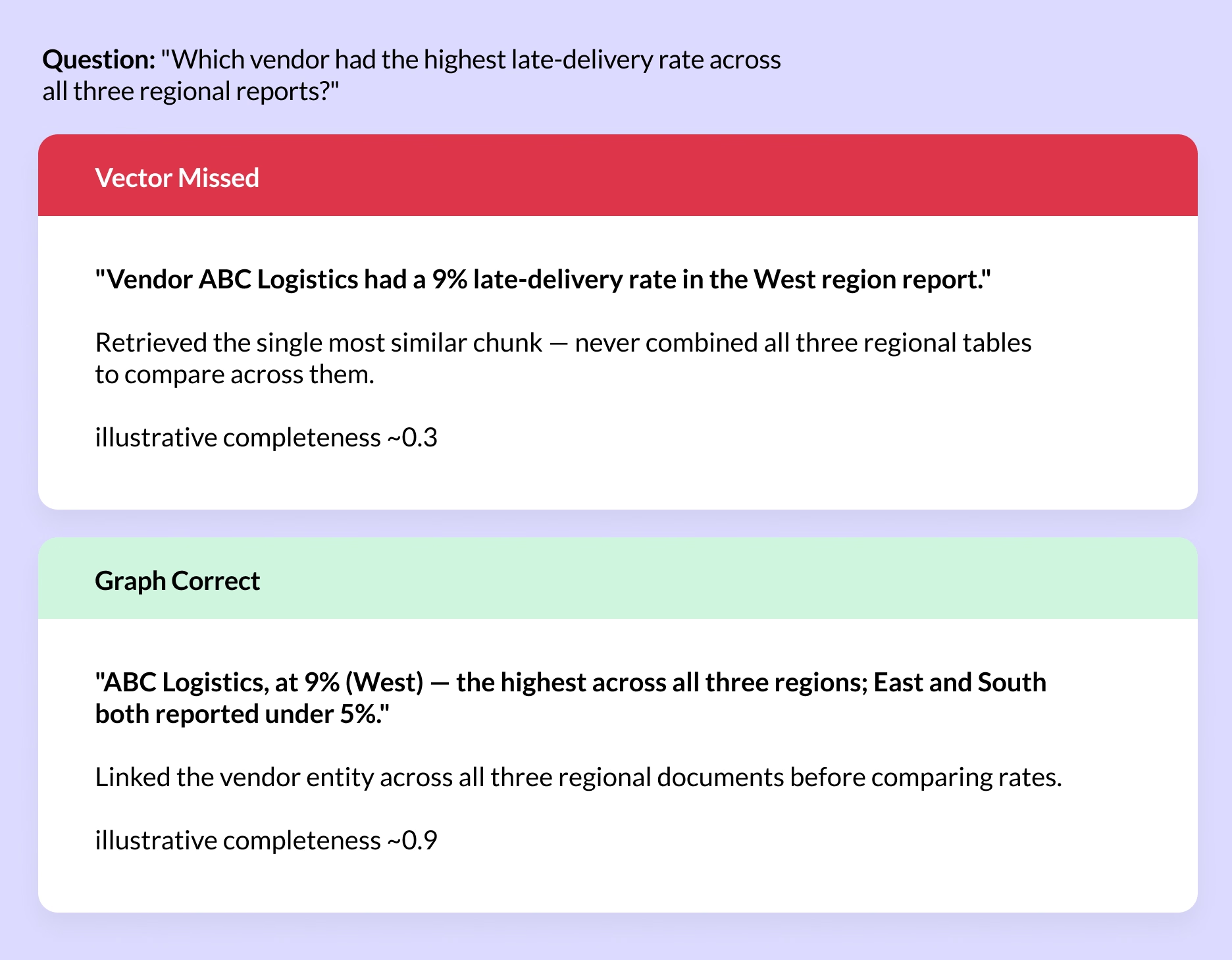
The vector answer is not wrong so much as incomplete. It retrieves one chunk, reports a single regional figure, and never checks the other two reports. The graph answer links the vendor across all three documents first, so it can say that 9% in the West is the highest of all and that East and South both stayed under 5%.
Multiply that difference across a full question set, weight it by what the use case actually cares about, and the mode that consistently connects the dots — not the one that merely retrieves fastest — is the one DocuMind recommends.
Which mode fits which use case — by design, not by decree
This mapping comes from how each mode is architected, not from a measured leaderboard — it's a starting expectation for where to look first, not a substitute for testing.
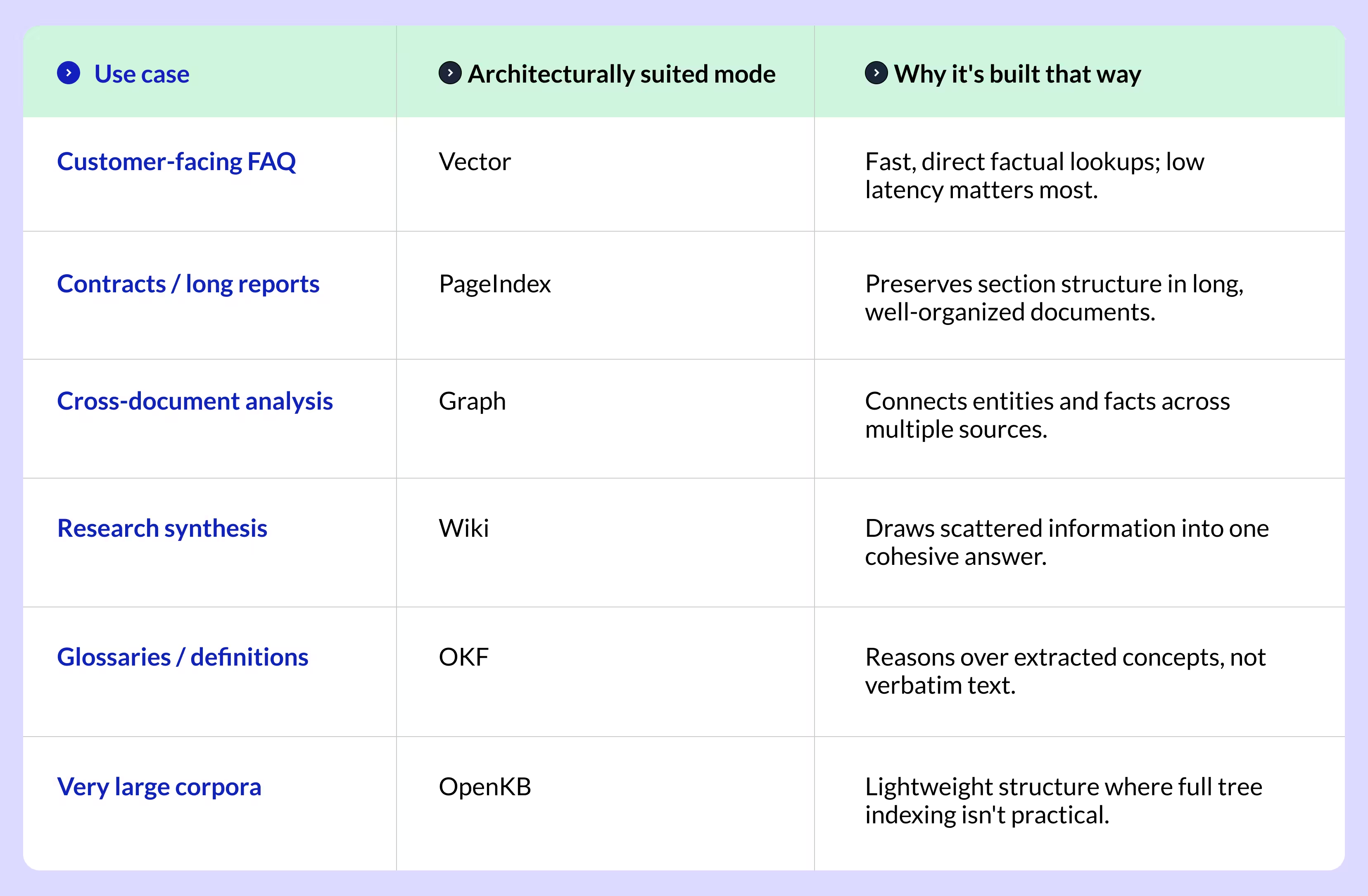
A starting expectation, not a guarantee — this is exactly why the benchmark still tests all six on your own documents rather than assuming this table.
Three likely winners — or all six?
The trade-off is cost against surprise. For most use cases, architecture already points you toward a likely shortlist. Take two examples:
- A customer-facing FAQ (short, self-contained answers, low latency matters): the three most likely winners are Vector, OpenKB and PageIndex — fast retrieval strategies suited to direct factual lookups.
- A compliance archive (long, heavily cross-referenced policy documents where faithfulness is everything): the three most likely winners are Graph, PageIndex and OKF — modes that preserve structure and connect facts across sections.
Those shortlists are a sensible starting expectation. But they're expectations, not results — architectural intuition is frequently wrong on real corpora. A mode you'd expect to lose sometimes wins because of how your specific documents are built: unusual formatting, inconsistent headings, tables that break chunking assumptions. Our own runs have shown exactly this, with a dark-horse mode topping the leaderboard.
So you have a choice — and either way, you stay in control:
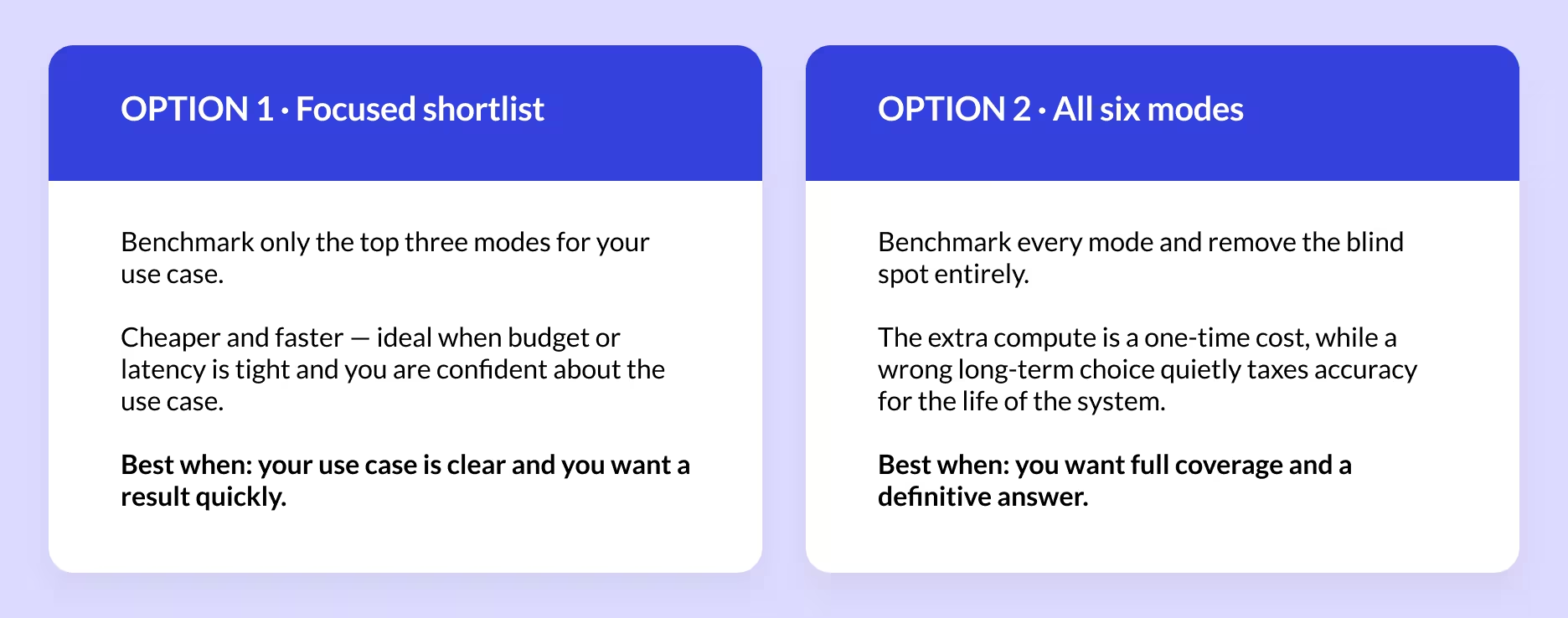
Find Your Ideal Mode
Answer a question about your use case:
What's your primary challenge? Choose the option shown above that fits you best, and your recommendation appears below.
- Fast factual lookups
- Long structured documents
- Multi-hop reasoning
- Research synthesis
- Conceptual definitions
- Very large corpora
Based on your use case, Vector is architecturally suited for you.
Remember: this is a starting expectation based on architecture. Always benchmark on your own documents for the final decision.
Scoring that matches your use case
A support FAQ and a compliance archive don't care about the same things. So the composite score behind every recommendation is weighted per use case — compliance work weights faithfulness and completeness heavily; a customer-facing FAQ weights relevancy and response latency more; a research use case rewards multi-document synthesis.
- Faithfulness & hallucination — does the answer stick to what the documents actually say?
- Completeness & relevancy — does it cover the key facts, and does it actually answer what was asked?
- Context recall — did the retriever surface the right material in the first place, independent of how the answer was worded?
- Latency & cost — reported for every mode, but kept separate from the accuracy score so a slower, more thorough mode (like Graph or PageIndex) isn't penalized for reasoning more.
"Accuracy decides which mode wins. Speed and cost only tell you what that accuracy costs to run."
One verified recommendation
Once every mode has answered every question and been scored on the use-case-weighted composite, DocuMind ranks the modes on accuracy and surfaces exactly one recommendation — the mode that answered your questions best, for your documents, for your use case.
Choosing with confidence
The point of benchmarking isn't to prove one RAG architecture is universally superior — none of them are. It's to answer a narrower, more useful question: given this corpus and this use case, which structure actually serves your users best. Vector for fast factual lookups, PageIndex for long structured documents, Graph for multi-hop reasoning, Wiki for synthesis, OKF and OpenKB for conceptual or lighter-structure corpora — measured, not assumed.
That's the difference between picking a RAG mode because it's popular and picking one because it's been proven, on your own data, to work.
A complete worked scenario, start to finish
1. The corpus and the goal
The knowledge base held a set of real technical research papers on retrieval — covering document-chunking strategies, semantic-quality metrics, GraphRAG-Router, and adaptive chunking. These are dense, cross-referencing documents where the same concept is often defined in several places. The goal was a research-grade assistant that could synthesize scattered findings and, crucially, refuse cleanly when a paper doesn't actually state a specific number.
2. Upload and question generation
The documents were uploaded and DocuMind auto-generated a benchmark set of 10 questions across four types — factual lookups (e.g. “What is the optimal chunk size in tokens recommended by Adaptive Chunking for financial regulatory documents?”), scenario questions, multi-document/comparison questions (e.g. “How does GraphRAG-Router compare with baseline methods overall?”), and synthesis questions — then verified each one before locking the set. The set deliberately included questions whose exact answer isn't stated in the corpus, to test honest refusal.
3. All six modes answer in parallel
The engine spun up an isolated knowledge base per mode, indexed the same documents six different ways, and ran the identical 10-question set against each. On a factual question like “What is the optimal chunk size in tokens recommended by Adaptive Chunking for financial regulatory documents?” the modes diverged sharply:
- Vector, PageIndex, Wiki and OpenKB correctly recognized the paper does not state a single optimal chunk size and refused honestly (faithfulness and completeness = 1.00).
- Graph and OKF hallucinated — they fabricated a specific range that isn't in the source (faithfulness and completeness = 0.00), the exact failure mode the benchmark is built to catch.
4. Use-case-weighted scoring
Because this run used the research profile, the composite score rewarded synthesis and completeness while keeping latency and cost reported but separate from the accuracy score. Every answer was judged by an independent LLM (Amazon Nova Pro) on faithfulness, relevancy, completeness and hallucination, and each mode's context recall was scored separately from how the answer was worded.
5. The recommendation
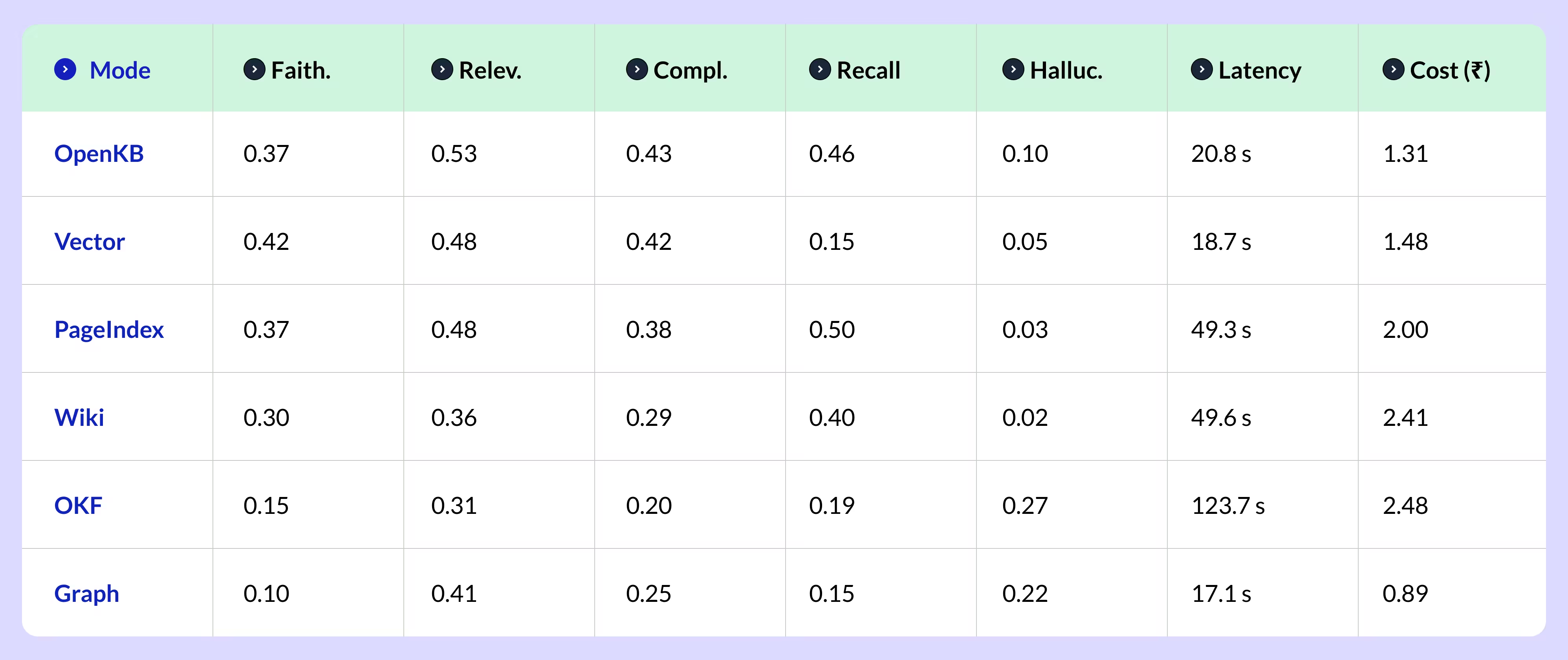
After all 10 questions × 6 modes were scored, the leaderboard was tightly bunched at the top — no mode dominated on this hard research corpus. OpenKB came out ahead on the composite (relevancy 0.53, completeness 0.43, recall 0.46) and, critically, kept hallucination low. Vector actually had the single highest faithfulness (0.42) but recalled very little context (0.15). The two modes you might expect to win a research task — Graph and OKF — finished last, both dragged down by high hallucination (0.22 and 0.27) after inventing details not in the papers. DocuMind surfaced one recommendation: OpenKB, with a composite score of 0.53 — a defensible, data-backed choice proven on the actual documents. The result is a textbook example of why architectural intuition (“Graph wins research synthesis”) has to be tested rather than assumed.
To make the whole flow concrete, here's an end-to-end walkthrough of a single benchmark run — run “Graph”. Everything below comes from an actual DocuMind run, scored by an independent judge model, not an invented illustration.
Full per-mode leaderboard from the run:
Ready to find your mode?
Don't inherit someone else's “best practice.” The only benchmark that matters is the one run on your documents, with your questions, weighted for your use case — and as the run above shows, the winner is often not the mode you'd expect (OpenKB beat Graph and OKF on a research corpus where intuition might have pointed the other way). Here's how to start in three steps:
- Upload a sample. A representative slice of your corpus — 20 to 30 documents is enough to get a reliable signal.
- Pick your use-case profile. Compliance, FAQ, research, or general — this sets how faithfulness, completeness, latency and cost are weighted in the composite score.
- Run and review. Get one verified recommendation plus the full per-mode leaderboard (like the table above), so you can see exactly why a mode won — and what its accuracy costs to run.
See it on your own documents
Tell us about your use case and we'll show you how the benchmark works on documents like yours — no generic best practices, just recommendations built around your actual data. It takes minutes to get started, and the insights are yours to keep.